# Salesforce Metadata Backup

{% hint style="warning" %}
As of April 2025, GRAX only performs incremental metadata backups. GRAX will take a snapshot of any new files or ones that have changed since the previous backup. For example, if a file was added on Monday, modified on Wednesday, and rolled back to the original version on Friday, GRAX will only save the three versions from Monday, Wednesday, and Friday.
{% endhint %}

GRAX supports periodic backup of all possible metadata objects from Salesforce. GRAX stores your metadata in the customer-owned storage solution (S3, Azure, etc), and the version history is available in the GRAX Diagnostics and Tools page.

## Configuration / Setup

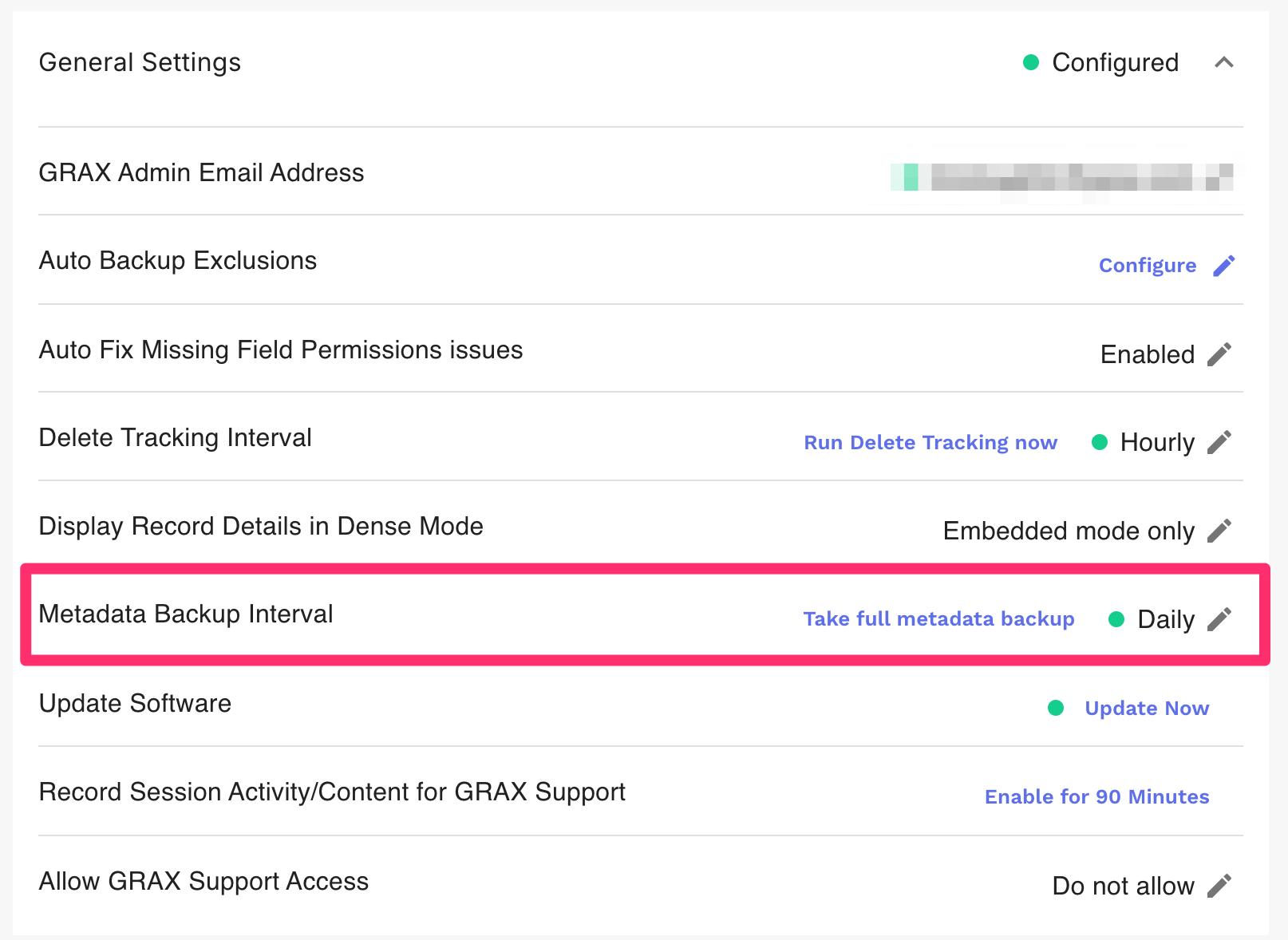
By default, GRAX checks for any new or changed metadata once per day. To change the metadata backup frequency, simply select a backup interval in the `General Settings` tab.

<figure><img src="https://4150568565-files.gitbook.io/~/files/v0/b/gitbook-x-prod.appspot.com/o/spaces%2FwHKnqFEg4DROpG3KCq3D%2Fuploads%2FLTWAkfWqbTZcfwXpwEXG%2Fmetadata-interval.png?alt=media&#x26;token=e4085461-9f08-4670-ab00-ad60dcdb4d94" alt="" width="563"><figcaption><p>Metadata Backup Interval Setting</p></figcaption></figure>

![Metadata Backup Interval Selection Window](https://4150568565-files.gitbook.io/~/files/v0/b/gitbook-x-prod.appspot.com/o/spaces%2FwHKnqFEg4DROpG3KCq3D%2Fuploads%2F4mJvon05SB8S7FSoTSN9%2F3dddf52-Screen_Shot_2022-05-02_at_7.11.43_PM.png?alt=media\&token=a9e311f4-39d7-4a1e-9ebd-c72ec0760c01)

## Working with Metadata Backups

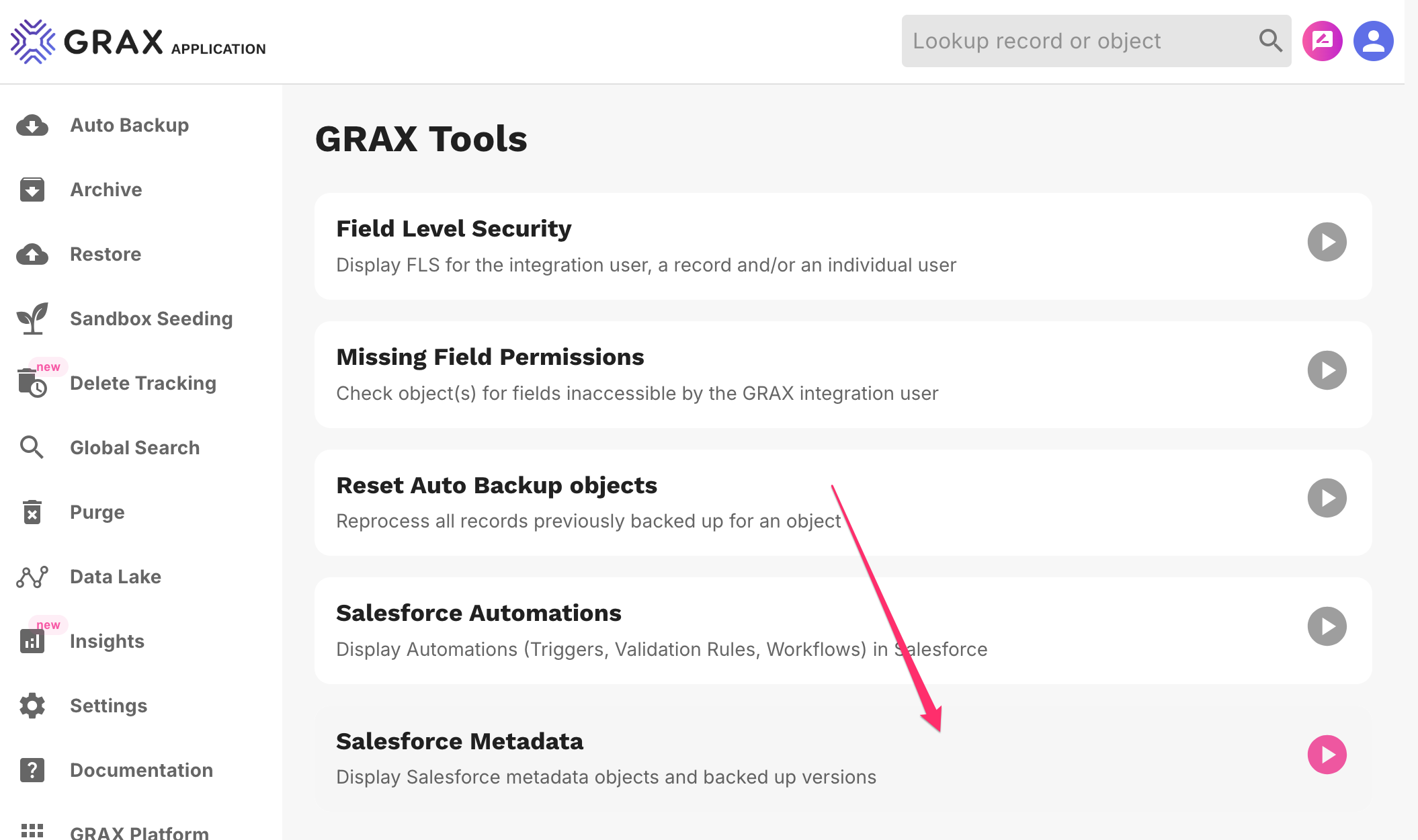
The metadata backups are stored in the customer-owned storage solution (S3, Azure etc) and can be accessed with the Salesforce Metadata viewer in the GRAX Diagnostics and Tools page.
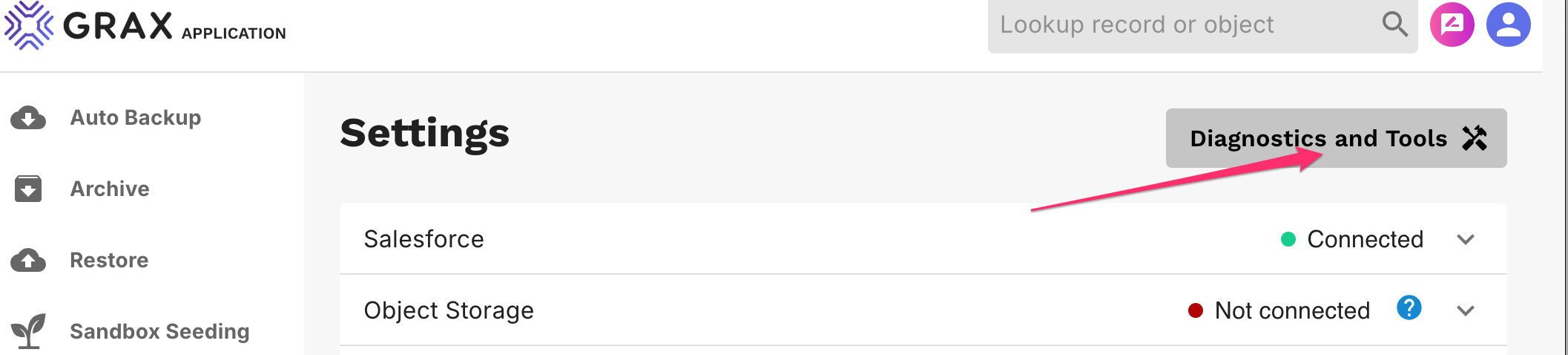
<figure><img src="https://4150568565-files.gitbook.io/~/files/v0/b/gitbook-x-prod.appspot.com/o/spaces%2FwHKnqFEg4DROpG3KCq3D%2Fuploads%2FlpA1Ml5YX5gd4XUGExiF%2Fsettings-diagnostics-tools.png?alt=media&#x26;token=5397c89c-b9c7-40ca-8974-8c299314e56e" alt=""><figcaption><p>Getting to GRAX Tools List</p></figcaption></figure>

<figure><img src="https://4150568565-files.gitbook.io/~/files/v0/b/gitbook-x-prod.appspot.com/o/spaces%2FwHKnqFEg4DROpG3KCq3D%2Fuploads%2FUarP2nDEI2z1whrsOkvZ%2Fmetadata-tools-menu.png?alt=media&#x26;token=c906c944-9f3b-4de2-b55a-20e06b742cce" alt=""><figcaption><p>Metadata Explorer in GRAX Tools List</p></figcaption></figure>

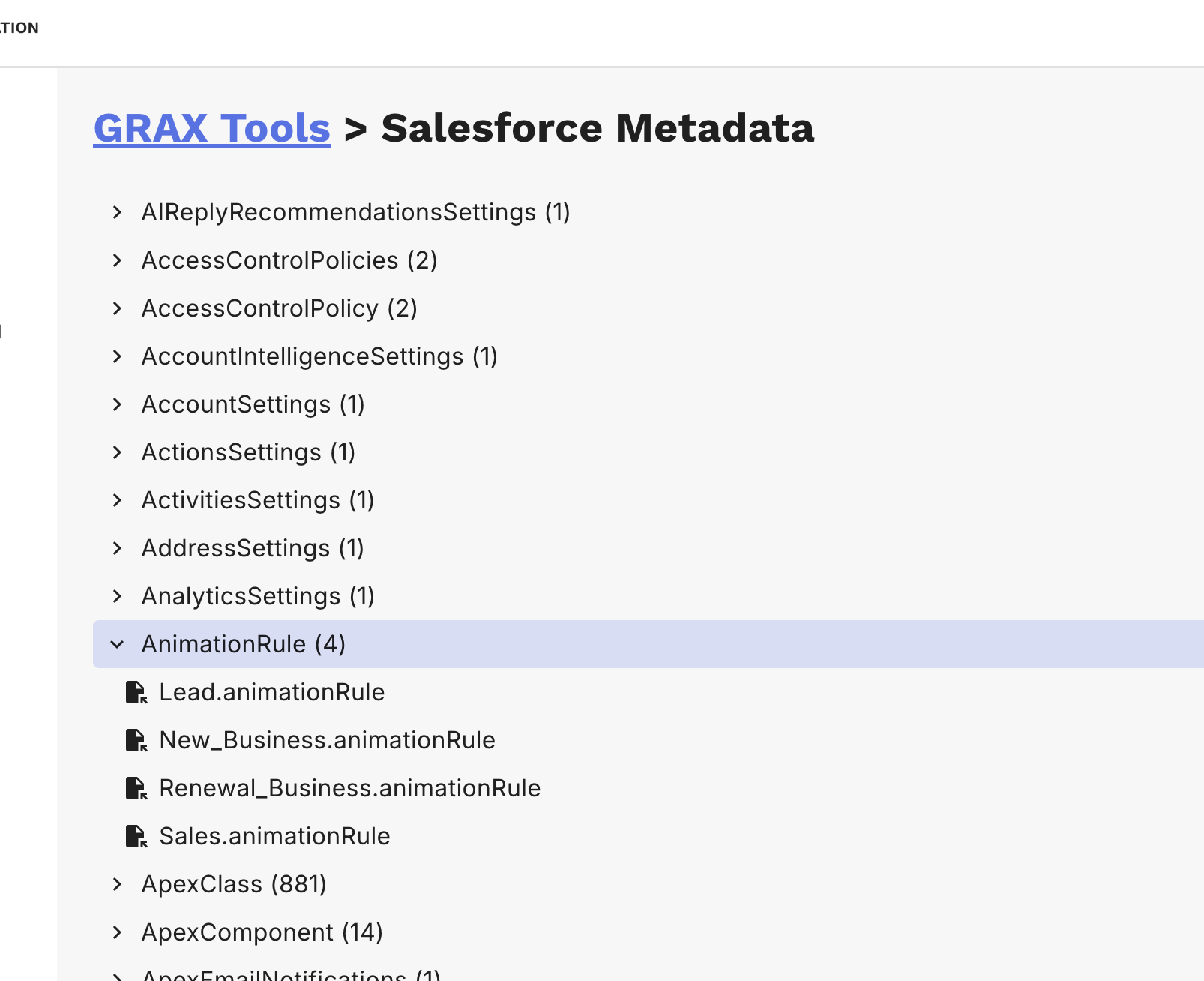
Metadata files are grouped by Salesforce Object Type

<figure><img src="https://4150568565-files.gitbook.io/~/files/v0/b/gitbook-x-prod.appspot.com/o/spaces%2FwHKnqFEg4DROpG3KCq3D%2Fuploads%2FmMEep1jPrbspOkcr6Kw5%2Fmetadata-object-type-files.png?alt=media&#x26;token=708ca2a1-69f2-4731-9451-dfaee7b8c0f9" alt=""><figcaption><p>Metadata Object Selection</p></figcaption></figure>

### Viewing Metadata File contents

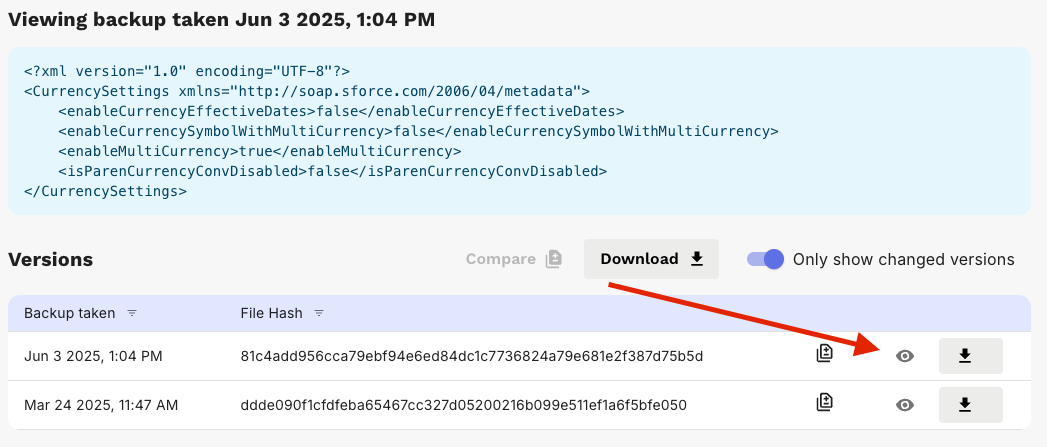
To view the contents of a metadata file version, click the Visibility / Eye icon for the desired version, the file will be displayed above the version list.

<figure><img src="https://4150568565-files.gitbook.io/~/files/v0/b/gitbook-x-prod.appspot.com/o/spaces%2FwHKnqFEg4DROpG3KCq3D%2Fuploads%2FbTu0Zm6E2z49ewA7dbbM%2FScreenshot%202025-06-03%20at%202.02.04%E2%80%AFPM.png?alt=media&#x26;token=1dfefc05-4ecf-4276-bdbe-91211a0b23b3" alt=""><figcaption><p>View Metadata Object Version</p></figcaption></figure>

### Comparing Metadata Versions

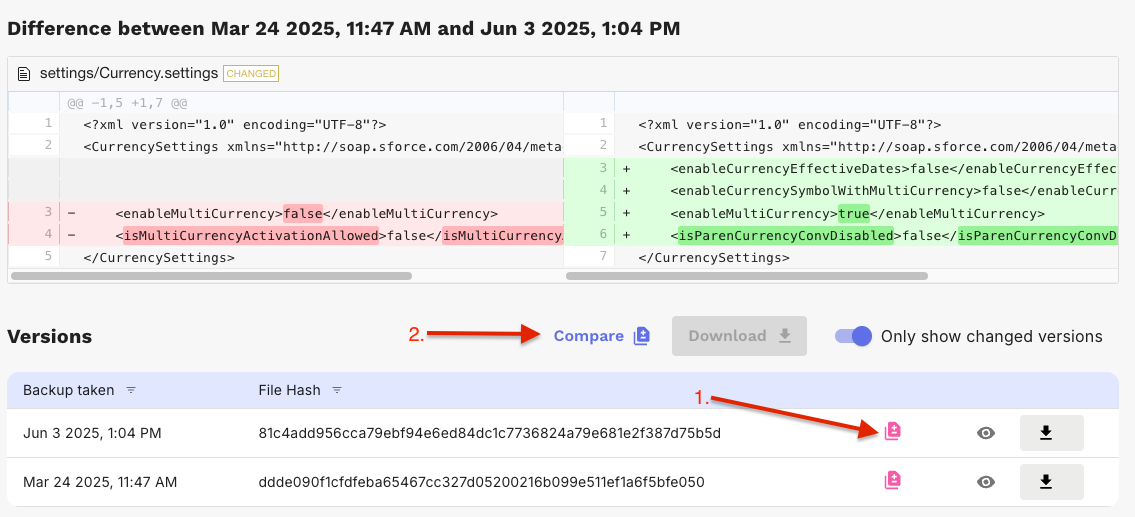
To see the differences between 2 versions of a metadata file:

1. Click the "Compare" icons to select the 2 versions you want to diff.
2. Once 2 versions have been selected the "Compare" button above the version list will be enabled. Click it to open a list of the changes between the 2 selected versions.

<figure><img src="https://4150568565-files.gitbook.io/~/files/v0/b/gitbook-x-prod.appspot.com/o/spaces%2FwHKnqFEg4DROpG3KCq3D%2Fuploads%2FHrS6q6ukWvYwrHhqxk1b%2FScreenshot%202025-06-04%20at%208.55.26%E2%80%AFAM.png?alt=media&#x26;token=938ef2ee-659e-4e7e-9010-60dde9d500a9" alt=""><figcaption><p>Metadata Object Version Diff View</p></figcaption></figure>

### Downloading Metadata Versions

To download the contents of a metadata file version, click the "Download" icon for the desired version.

<figure><img src="https://4150568565-files.gitbook.io/~/files/v0/b/gitbook-x-prod.appspot.com/o/spaces%2FwHKnqFEg4DROpG3KCq3D%2Fuploads%2FdZ9fce1PLPHvE7riPbnM%2FScreenshot%202025-06-04%20at%209.14.38%E2%80%AFAM.png?alt=media&#x26;token=0e17ec47-66ba-4513-a951-d83c0672bb97" alt=""><figcaption><p>Metadata Object Version Download</p></figcaption></figure>

## Frequently Asked Questions

### Which Salesforce API is used to determine what metadata is backed up?

We utilize the [describeMetadata()](https://developer.salesforce.com/docs/atlas.en-us.api_meta.meta/api_meta/meta_describe.htm) API.

Additional documentation on Salesforce's metadata API can be found [here](https://developer.salesforce.com/docs/atlas.en-us.api_meta.meta/api_meta/meta_intro.htm).

### Why does the Salesforce Metadata Tool in GRAX not show metadata for all of my objects?

This [describeMetadata()](https://developer.salesforce.com/docs/atlas.en-us.api_meta.meta/api_meta/meta_describe.htm) API call retrieves the metadata that describes your organization. This information includes Apex classes and triggers, custom objects, custom fields on standard objects, tab sets that define an app, and many other metadata types. **Standard objects without custom fields are not included in this data.**